Frequently asked questions
How can I add or update a dog?
You have to create an account with Akita Pedigree to be able to update or add a dog. Go to the Login page and click onto "Create an Account".
Why can't I delete a dog/person?
Due to security reasons the deletion of a whole record (dog or person) is only allowed to Akita Pedigree administrators.
Therefore please always
check the list of available dogs/persons presented to you during the add-process, before adding a new dog/person.
Anyhow, if you happen to
create a wrong new dog/person entry or have found a record you would like to delete, please contact the
Akita Pedigree Administrator.
What about kennels?
There's no kennel management provided by Akita Pedigree. The kennel information is only stored as simple value in a dog's record.
On the
dog's update page you can choose from the existing list of kennels (in the textfield type the first letters and you will receive
a list to choose from - be patient this may take a while depending on bandwidth and database size) or type in a new kennel name.
How to add sire or dam for a dog?
Adding the sire or dam to a dog is best done by using the pedigree's "Add
Dog"-links on the detail page.
If you know, that your dog's father
or mother is already available in the database you could also use the input
fields on the update-page. There you would have to enter the first three
letters of the sire's or dam's registered name and you will receive all
sires/dams in the database starting with these letters. Please be aware
that retrieving this list may last long depending on bandwidth and database
size. We therefore encourage you to use the "Add Dog"-links on
the pedigree of your particular dog.
How to manage persons, owners, breeders?
The management of persons in Akita Pedigree allows to add persons, browse persons, view and change details of a person. Please be aware that the deletion of persons is only allowed to Akita Pedigree Administrators! A person in Akita Pedigree can (but does not need to) have the role of "breeder" or/and the role of "owner". In principle persons are added to Akita Pedigree by clicking on the "Add Person" entry in the menu which you can find on top of each page, see Screenshot A:
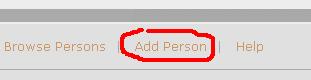
Screenshot A
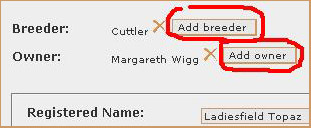
Screenshot B
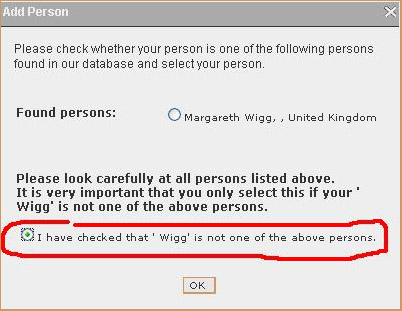
Screenshot C1

Screenshot C2
Please note: It is possible to enter more than one breeder or owner for a dog. Moreover clicking on the
 symbol next to a name, does only remove this person as breeder or owner of a dog
but does not delete the person from the database!
symbol next to a name, does only remove this person as breeder or owner of a dog
but does not delete the person from the database!
Cookies
Visiting this website with your browser settings adjusted to accept cookies tells us that you want to use our services and that you consent to our use of cookies and other technologies to provide them to you as described in this notice.
See below for information on how to modify the settings in your browser so that you can disable cookies.
What is a cookie?
A cookie consists of information sent by a web server to a web browser, and stored by the browser.
The information is then sent back to the server each time the browser requests a page from the server.
This enables the web server to identify and track the web browser.
Cookies are also used for the placement of advertising based on the user's interests and behaviour,
and to control advertising content on our website.
What types of cookies exist?
First-party cookies: a cookie set by The Breed Archive.
Third-party cookies: a cookie set by a domain name that is not the domain whose name appears in the browser address bar.
Session cookies: temporary cookies that are deleted from your computer when you close your browser. We will use the session cookies to keep track of you whilst you navigate the website.
Persistent cookies: permanent cookies that remain stored on your computer until deleted, or until they reach a specified expiry date. We will use the persistent cookies to enable our website to recognise you when you visit and provide you with a personalised service, e.g. by storing your preferred language.
Which cookies do we use?
cookieInfoAccepted: session cookie that stores your consent to our use of cookies on this site (not set for logged-in users).
language: session cookie that stores your preferred language if it varies from the standard language setting of your browser.
Cookies and browser settings
Common web browsers allow you to control the use of cookies, see for example:
Chrome: https://support.google.com/chrome/answer/95647
Firefox: https://support.mozilla.org/de/kb/cookies-erlauben-und-ablehnen
Safari: https://support.apple.com/kb/ph21411
Edge: https://privacy.microsoft.com/en-us/windows-10-microsoft-edge-and-privacy
Blocking all cookies will, however, have a negative impact upon the usability of many websites, including this one.